16 de mayo de 2025 | 7 minutos
Guía histórica de Make (la fuente indica el 16 de mayo de 2025). Este artículo reproduce una guía publicada entonces por Make. Los ejemplos, plantillas, módulos y funciones citados son los de esa guía y ese momento, no una ejecución real de este sitio ni una garantía de disponibilidad, compatibilidad, precios o resultados vigentes. Para el estado actual, consulta las fuentes oficiales. John Hu, socio de Make con 20 años de experiencia en compras, muestra cómo clasificar datos desordenados utilizando un enfoque único de IA. Tomando las clasificaciones W-9 y NAICS como ejemplo, usar Make junto con IA ahorra horas durante el proceso de incorporación.
El conocido proverbio sobre cómo resolver problemas grandes y difíciles dice: “¿Cómo te comes un elefante? Bocado a bocado”. Pero, como demostró John Hu, presidente de Axanexa en uno de los webinars recientes de Make, ir bocado a bocado es también una de las mejores formas de conseguir que la IA dé respuestas coherentes y fiables. Esas salidas precisas y fiables se pueden incorporar después a flujos de trabajo más amplios para automatizar problemas como clasificar información de formato libre y la introducción de datos, problemas que hasta ahora han requerido intervención humana. Veamos lo que John compartió sobre cómo sacar el máximo partido a tu IA, a tus Make AI Agents y a tus escenarios en general mediante un enfoque paso a paso de prompting y resolución de problemas.
El problema: transferir datos de formularios o diagramas de flujo a tu CRM
Las compras son más que encontrar al proveedor adecuado: una vez que has dado con el contratista o la empresa con la que asociarte, empieza el papeleo. Necesitas mantener registros meticulosos para asegurarte de que se emiten los formularios correctos, se pagan los impuestos correctos y la información correcta llega a las personas adecuadas dentro y fuera de tu organización.
Si haces negocios en Estados Unidos, incorporar a un contratista individual implica solicitar su formulario W-9. Asociarse con una empresa implica, entre muchas otras cosas, asignarle un código NAICS de cinco o seis dígitos que la clasifique en la línea de actividad correcta. No hacerlo bien en cualquiera de los dos casos implica riesgo de multas o consecuencias legales en caso de auditoría, perder ventajas fiscales y/o no ser elegible para lucrativos contratos públicos.
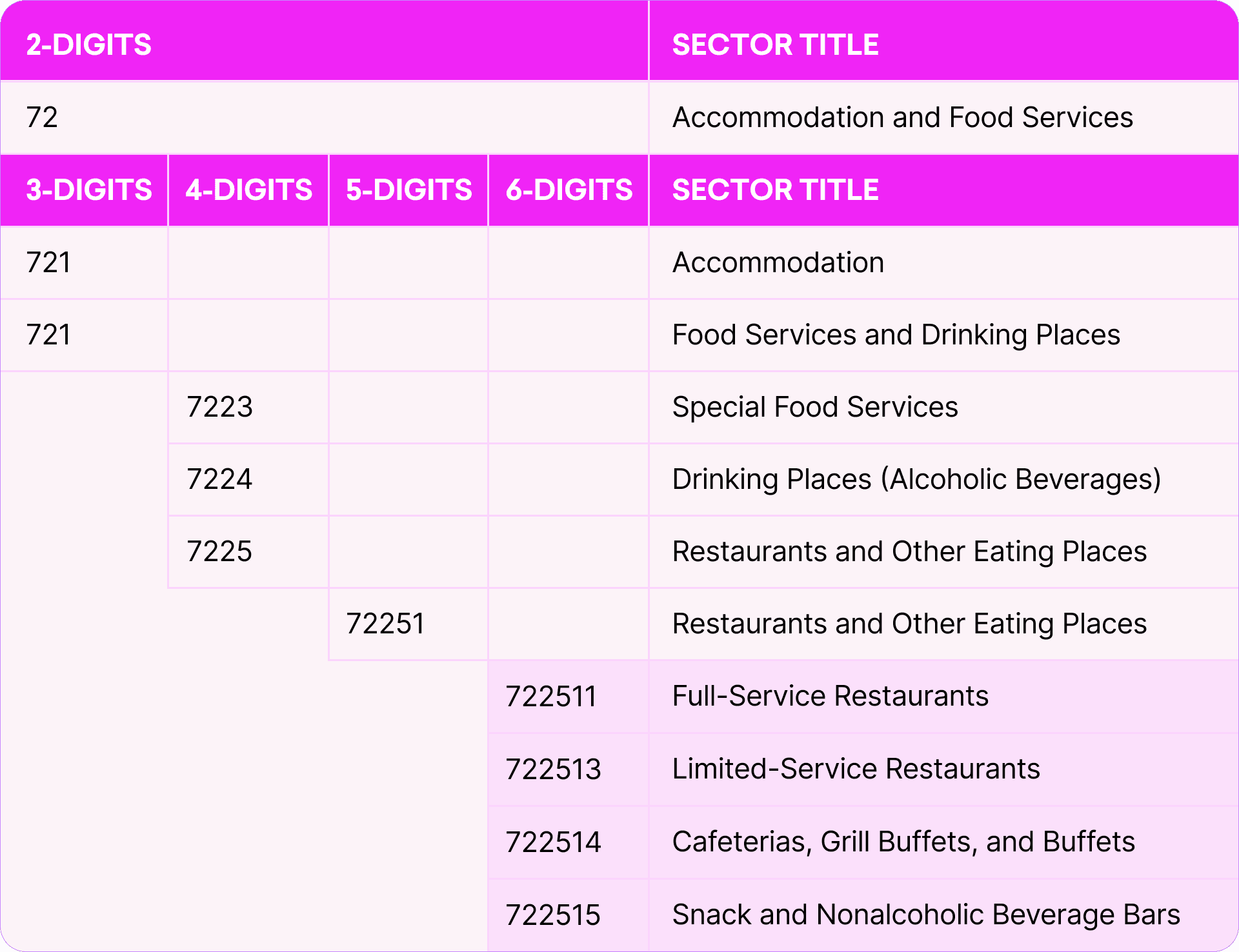 Por desgracia, la mayoría de los sistemas automatizados no son capaces de identificar correctamente si un formulario es un W-9 válido, y mucho menos qué campos contienen información muy variable, como nombres y números de identificación fiscal. Y encontrar el código NAICS correcto requiere conocer el negocio y saber navegar por un diagrama de flujo de varios niveles con cientos de resultados posibles.
En ambos casos, trasladar la información del contratista o de la empresa a tu sistema ha sido en gran medida una cuestión de introducción manual de datos: una tarea tediosa, pero que sigue requiriendo el pensamiento crítico y la precisión de trabajadores humanos lentos y, seamos sinceros, caros. Los intentos de eliminar este paso manual y acelerar esta parte del proceso de incorporación existen desde hace décadas y han sido infructuosos.
Por desgracia, la mayoría de los sistemas automatizados no son capaces de identificar correctamente si un formulario es un W-9 válido, y mucho menos qué campos contienen información muy variable, como nombres y números de identificación fiscal. Y encontrar el código NAICS correcto requiere conocer el negocio y saber navegar por un diagrama de flujo de varios niveles con cientos de resultados posibles.
En ambos casos, trasladar la información del contratista o de la empresa a tu sistema ha sido en gran medida una cuestión de introducción manual de datos: una tarea tediosa, pero que sigue requiriendo el pensamiento crítico y la precisión de trabajadores humanos lentos y, seamos sinceros, caros. Los intentos de eliminar este paso manual y acelerar esta parte del proceso de incorporación existen desde hace décadas y han sido infructuosos.
“Llevo 20 años de mi carrera en compras y puedo decirte que este es un problema común y constante en todos los ámbitos durante los últimos 20 años”. – John Hu Por suerte, la IA puede automatizar ahora tus flujos de entrada de datos y clasificación. Así es como.
Las herramientas: CRM, ChatGPT y Make
Como mostró John, esta tarea aparentemente compleja solo necesita unas pocas herramientas básicas. Usó el CRM Monday como aplicación principal y ChatGPT de OpenAI como IA, conectándolos en Make. Necesitarás cuentas para usar todas estas apps, pero no olvides que puedes empezar con Make gratis. Si usas otro CRM u otra IA, no te preocupes: según la guía de 2025 Make admitía más de 2.000 apps. En ese caso, los detalles pueden variar ligeramente —sobre todo a la hora de afinar tus prompts—, pero el esquema general y, desde luego, los consejos siguientes deberían seguir siendo válidos.
La configuración
Extraer la información del W-9 con IA
Para esta parte de la demostración, John configuró un escenario de Make relativamente sencillo. Con unos pocos módulos, pudo tomar una imagen subida a su instancia de Monday, pasarla por una IA LLM para analizarla y enviar los resultados de ese análisis de vuelta a su CRM para seguir actuando sobre ellos.
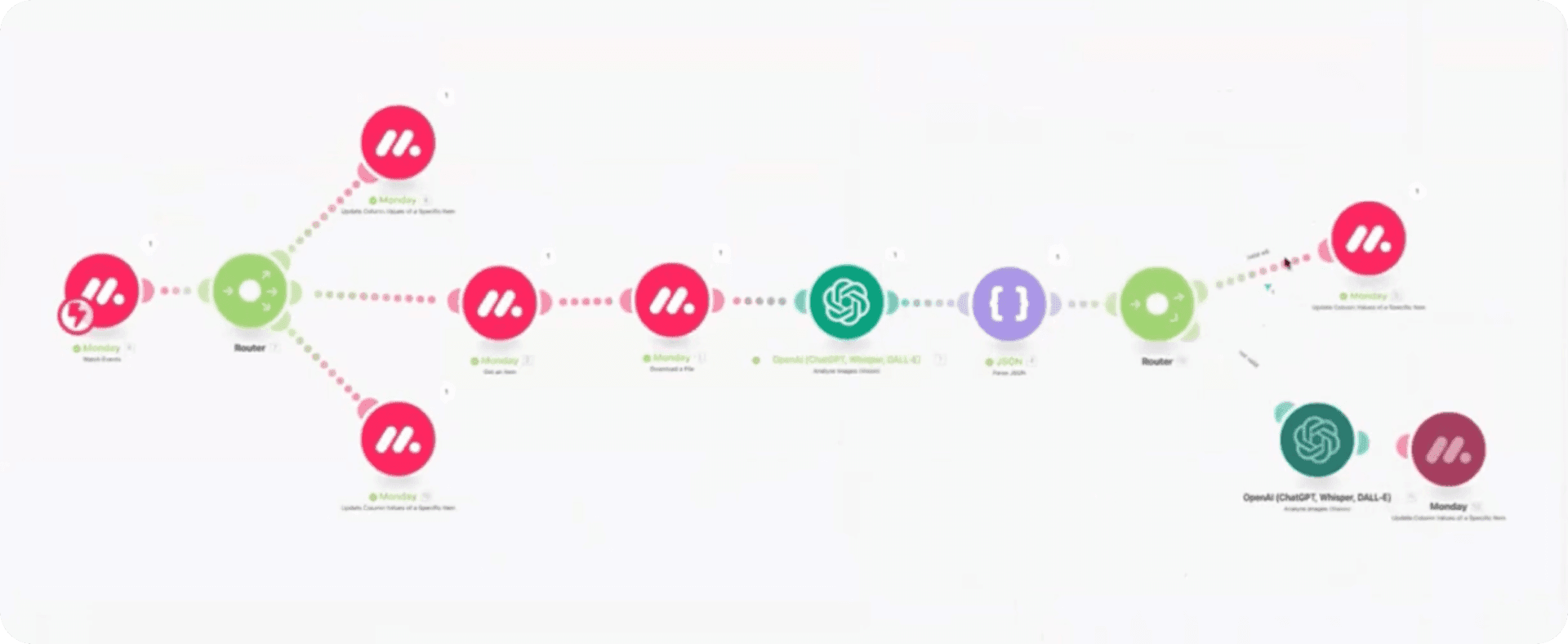 La parte crucial de este flujo de trabajo está justo en el centro, donde aparece por primera vez el módulo ChatGPT. Asignando un bundle —la imagen de un W-9— desde los módulos Monday anteriores al módulo ChatGPT y dando a la IA una instrucción de una frase, John consiguió que todo el escenario funcionara. Veamos su prompt, ligeramente depurado:
Please respond ONLY in JSON { w9:"Yes or no}", name,tax_id,error:} if w9 being Yes if it's a valid W-9 and No if it's not En el ejemplo de John, esto bastaba para obtener una respuesta que se podía asignar a un módulo JSON, que después pasa al paso final de actualizar Monday con los resultados. Si es un formulario W-9 válido, este paso final consistirá en actualizar los campos de Monday correspondientes a las salidas del JSON: rellenar el nombre del contratista, su número de identificación fiscal y añadir un indicador visual de que el formulario está validado y listo para usar. En el ejemplo, el flujo de trabajo funcionaba incluso si se subía un formulario inadecuado. Usando el mismo escenario y el mismo prompt, el ChatGPT de John fue capaz de identificar correctamente que no era un formulario fiscal válido. Aunque es opcional, también añadió un último paso que podía aportar información adicional valiosa o simplemente un toque de diversión. Añadiendo un segundo módulo de IA filtrado para ejecutarse solo cuando hubiera una imagen no válida, conseguía averiguar automáticamente qué sí aparecía en la imagen —en este caso una foto de su hija— y subir esa información a Monday —en este caso con el estilo lingüístico de William Shatner—.
Clasificar información con IA
Pero John no había terminado: pasó a asignar un código NAICS a un restaurante de alta cocina. La idea era similar, pero completarla con éxito requería no solo recurrir a un puñado de fuentes de datos externas, sino también navegar por esas fuentes en subpasos pequeños. Y en todo momento el componente crucial eran las capacidades de IA de ChatGPT.
El paso inicial tuvo lugar en Monday. Importando primero una lista de los más de 600 códigos NAICS válidos en cada nivel de la jerarquía —donde 11 es la categoría de nivel superior de las empresas agrícolas, 111 la reduce a producción de cultivos, 1111 a cultivo de semillas oleaginosas y cereales, y así sucesivamente—, John puso a disposición todos los códigos posibles que la IA podría producir al final del escenario.
Después empezó a construir su escenario de Make indicando a un módulo de IA que reuniera y resumiera información en línea sobre una empresa de muestra —el restaurante de alta cocina Alinea— a partir de unos pocos datos básicos.
En apariencia, después bastaría con emparejar ese resumen de la empresa con el código NAICS correcto. Sin embargo, no es así como lo ve la IA. Como explica John: “Si miras Alinea en conjunto, si miras el código NAICS en conjunto, podría estar en unos 10 sitios y es inconsistente. Si le pides a alguien que elija 1 de 10, podría ser cualquiera de ellos. Pero si le digo que elija solo 1 de 3, hay mucha más probabilidad [de acertar] eligiendo 1 de 3 que 1 de 10”.
Esta forma de pensar marcó el resto de su escenario de varias rutas. John indicó primero a su IA que usara su pensamiento crítico para emparejar el resumen de la empresa con 1 de los 25 códigos NAICS de nivel superior, más de un orden de magnitud menos que adivinar entre los cientos de códigos. Ese código de nivel superior, 72, volvió a Monday, del que su escenario de Make volvió a tirar. Usando una serie similar de módulos pero con la condición previa de que el siguiente código debe estar dentro del código de nivel superior, volvió a pedir a su IA que eligiera entre un puñado de opciones, produciendo el código 722. “Se ve cómo se va bifurcando por el camino de lo que debería ser”, en palabras de John.
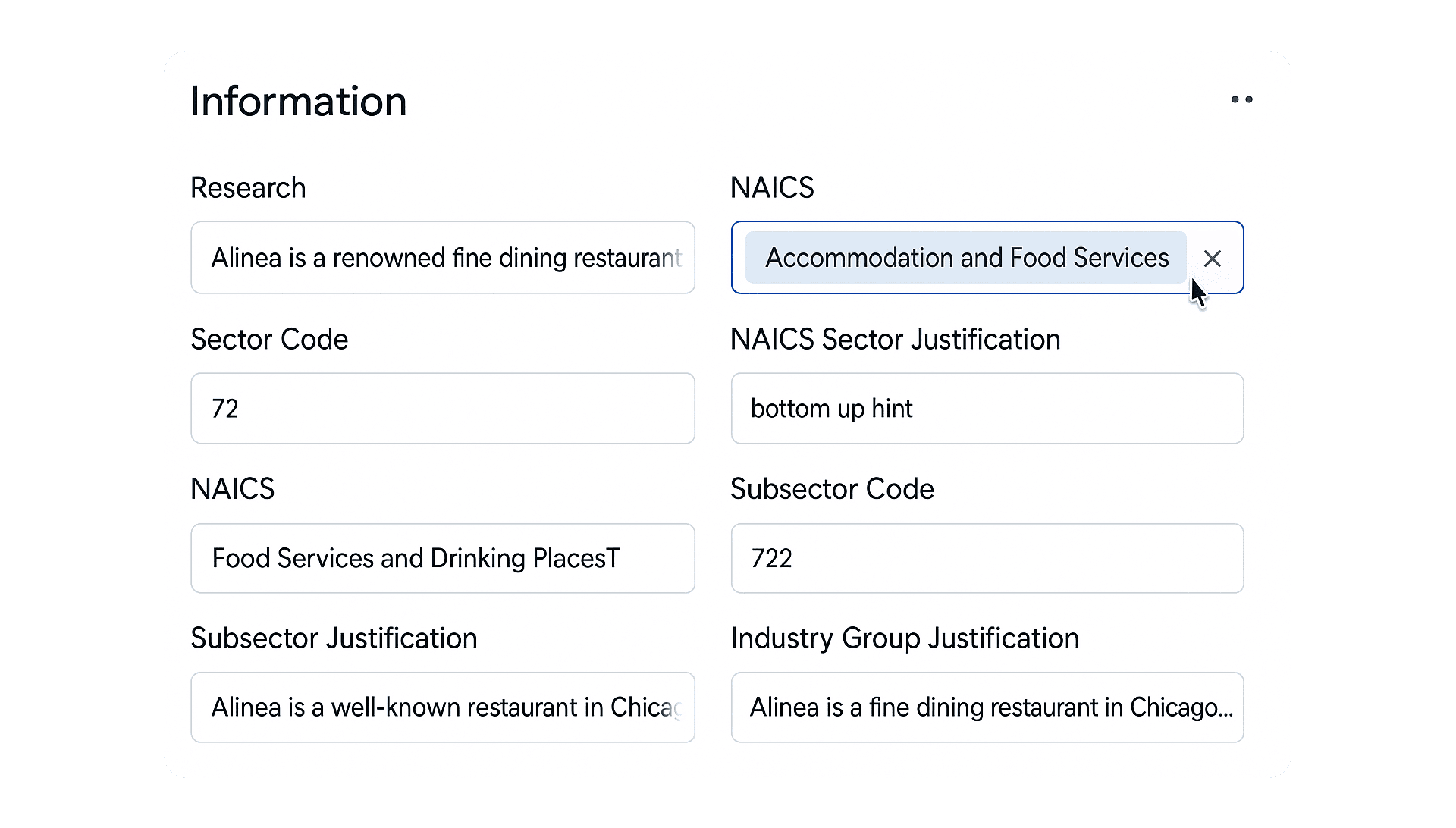 Tras unos cuantos bucles, su CRM se actualizó automáticamente con el código NAICS específico —y correcto— 722511 para restaurantes de servicio completo.
Cómo la IA ahorra tiempo, costes y frustración
Los dos escenarios de John se movían entre la automatización determinista y la no determinista para lograr cosas que sencillamente no serían posibles sin IA. En su ejemplo del W-9, ChatGPT usó reconocimiento de imágenes, reconocimiento óptico de caracteres (OCR) y dominio de JSON para reconocer, analizar e informar sobre el contenido de una imagen en un solo paso. No solo los intentos previos a la IA de automatizar esta tarea requerirían varios pasos en múltiples programas que probablemente arrojarían resultados en distintos formatos, sino que además lo harían con una precisión dudosa que habría que comprobar dos veces y ensamblar manualmente con intervención humana. Probablemente, llegado a ese punto, no merecería la pena intentar evitar la intervención humana en absoluto. Pero la IA hizo todo esto trabajando sobre una sola frase en lenguaje natural, del mismo modo que podrías formar a una persona de nivel inicial para la entrada de datos en la oficina. Asignar un código NAICS fue similar. De forma parecida a formar a un empleado de oficina administrativa en los códigos NAICS, que cambian constantemente —esencialmente un enorme diagrama de flujo—, y luego indicarle que investigue cada contratista que llegue, ChatGPT fue capaz de encontrar, sintetizar y cotejar datos cuando se le proporcionaron las fuentes de datos correctas. Las únicas diferencias eran que ChatGPT lo hizo al instante, con una menor probabilidad de errores y sin aburrirse ni preocuparse por su satisfacción laboral.
"Esto ahorrará cantidades indecentes de horas, dolores de cabeza, dinero, procesamiento…Este diminuto caso de uso…ahorrará el equivalente a quizá media hora de trabajo." – John Hu
Pon freno a las dificultades de la entrada de datos y la clasificación
Cuando se dispone de los datos adecuados, las instrucciones adecuadas y la mentalidad adecuada, AI automation puede ser una forma potente de agilizar tareas importantes —aunque complejas y tediosas— como el registro de datos de empleo. Si estás listo para hacer más eficiente y rentable tu área administrativa con IA en Make, regístrate para obtener una cuenta gratuita o reserva una demo hoy mismo.